Olivia Wilde retro polaroid


Who don't know this sweet looking sexy woman? Yes!! she's the Tron girl, Quorra.. :D my fav i could say! This is for uuuuu, O.wilde's fannnnn!! We'll, there's some tips i'm goin to share with u guys.

i)Retro trick:
a) open ur image in photoshop.
b) new layer> paint with yellow> multiply it> and adjust opacity if needed
c) new layer> paint with dark blue> lighten> and adjust opacity if needed

and u'll get from this:
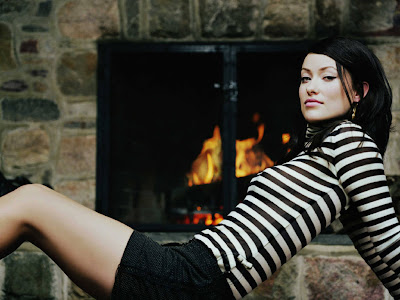
to this:


well, of course u can add scratches and noises or even overlay it with old paper picture. It will even look more dramatic! and i like it :D but im in rush so i don't have time to scratch and put noise and else xD

ii) create polaroid:
a) choose white color
b)create square shape behind the image

2 simple steps and u're done with polaroid! no more talking coz am going to sleep now :p byebye zai jian and GOOD LUCK ;)


random

randomness.
This time I made the background text using smaller font
I think it look nicer.
but,it depends on the eyes of beholder C;
everyone have their own opinion right? so nobody right or wrong in this case I should say.
Just splash out ur creativity! have fun :)

follow ur heart. and maybe ur brain too. can ur heart make decisions?
I think only brain can :p wahahahah

grungy typography

This is my birthday gift to Fira Lullaby~ my besties in college. Actually, it's just a simple typography but I decided to turn it into some grungy look. So, it won't look too boring. If you always wanted to create this kind of typography, it's very easy. Just open your photoshop, and follow these steps:

1) Paint the background with any color of your choice.

2) New layer( I will call this layer 1)> Type any random text as the back text. (As for me, I've type "happy birthday" and copy the layer until it cover all the spaces and merge it)

3) New layer( I call this layer 2)> Text your friend's name or something u like. In my case, I just type Fira. (use an extra big big font)

4) Hit ctrl button+ left click on the layer 2 thumbnail.

5) Click on the 'eye' to hide ur layer2

6) Click layer 1, then ctrl+c (copy) and ctrl+v (paste)

7) change the color overlay and u're done! =)

It's one of the most simple thing in the world! xD Well, go ahead and try it. Add some paint on it to make it looks cooler :)

生日快乐 mira

You know,I always had trouble when it comes in choosing presents: what should I buy?, what colour?, this or that?, Ohh..this one nicer, nahh..that one's better and that kind of bla3 which will never end unless I close my eyes and randomly pick one (I'm lying..I never did that. Im very good in making decisions xD). Photoshop become handy if you had the same problem like I do :D Just open the photoshop, create new file and splash anything on top of it like Van Gogh did in his painting!and put a text on it "HAPPY BIRTHDAY" or whatever u prefer. yeah, that's what we call ART :p after all the lil.work and a lot of rest.. Im presenting to u.. the most outrageous....phenomenon... beyond ur wildest imagination.... tadaaaaaa!!

A present from a humble friend.

So,this present from the humble friend is actually inspired by this:

First time when that 'humble person' gazing at this inspiring piece of art, she was like ZOMG! This is amazing. Raise up ur hand if u agree with me. Cant u see the simple but... but... I have no words to describe it (Yeah, lack of vocabs. How did u know? T.T) I just love the way how the aura flowing out from adam! and did I mention? the starry background? Oh oh, I just love it! Yea, if u dont know I really love galaxy type of art. I did create some universe piece like Andy in universe I and II.Also,if u look back at the inspiring piece of art, you can see the color combination is perfect. I know it's typical colour combination but who don't luv it? It looks great! :)


have a break. have a tea.

Click on the picture for better view

Aloha mi amore :D Yessssss.. Im having some sips on my fav. lemon tea!!! *gimme a big YAY if u love lemon tea or perhaps any tea will do :D * I guess all of my friends know that im a tea lover. (so what? who cares? lol) While sipping the tea, I managed to create this amazing wallpaper for my desktop. yea yea, I know Im exaggerating. Its not really that amazing. I know u can do better ;) Looking at this wallpaper while typing this entry, something pop in my mind telling me that I prefer the girl holding a cup of tea rather than a purse! lol. It kinda suits her too if she were holding a cup. Dont u think so? Well anyway, if u're interested to make this kind of wallpaper, just simply go grab a cup of tea and click to Dainis! Good Luck and have a great tea time C:

Extra info for health.Do u know tea contains:
  • antioxidant- helps to slow down aging and helps cells to regenerate and repair (tips to stay young! ;))
  • tea has less caffeine than coffee
  • tea helps u keep hydrated
  • it can boost ur mental health too! *superlike this fact* :D
p/s: however,just limit to 1-2 cups a day as caffeine leach calcium from ur bones

thanx to google, I can easily have a cup of lemon tea xD

well,how bout lemon?
  • lemon is a natural strengthening agent to the liver enzymes
  • and...bla3..u can google urself. Dont be lazy! :p ( There's a link at the bottom for lazy ppl.. :D)
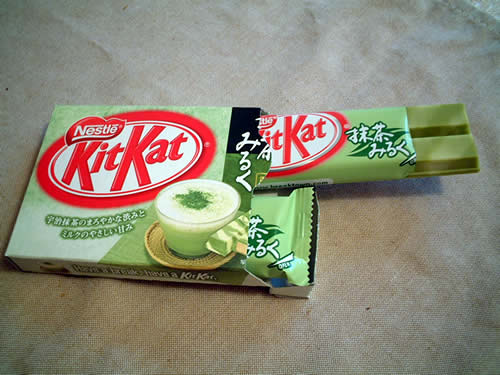
and yeah, another thing, I don't know kit kat have a green tea flavour o.o


romantic and fantasy-like effects


Create an easy dreamy mood on ur picture! I learnt this 6 steps trick from Gavin Hoey's yt channel. Just follow these steps and u're on ur way on becoming America's Next Top Model.. just joking :p Well, lets just begin:

1) Unlock your picture layer
2) Duplicate it 2 times (now u hve original layer, copylayer 1 and copy layer2)
3)click on copylayer1> filter> blur> motionblur> angle:45degree> distance: choose any of ur desire
4)click on copylayer2> filter> blur> motionblur> angle:-45degree> distance: choose any of ur desire
5) Set the blending mode for copylayer (any one) to screen (or any type u like)
6) Merge the copy layer ..
Done!
you can adjust the opacity of the copy layer too :)

This is the pretty and pro original picture!

Did you realize the starburst effect? Some sort like cross stitch but more in a soft looking stitches. I think this effect will look amazing if the background of ur pic is not plain. Go ahead and try it ;) Good Luck!

Retouching


A simple touch sure does make a huge difference! Natural soft look always the best for bride and wedding pictures.However, the crucial part is maintaining the realistic aspect. We don want to make the bride look too dolly/plastic or in other word- fake. Just retouch minimally hiding flaws and add back the color loss due to photography flash


image from http://www.inmagine.com/searchterms/wedding-3.html (royalty free)